The Floor: run the room from one screen
The director's screen for a live tournament or cash game: the clock's controls, players one tap from a bust or rebuy, what needs you next, and an action log you can undo.
- The Floor is a Premium feature, judged by the club owner's plan. On Free, the Floor shows the game's heading and its live clock; the rest of the board is locked.
The clock is the room's screen. The Floor is the director's: one screen to run a live tournament or cash game from, on a laptop, an iPad or a phone. It holds the clock's controls, every player one tap from a bust or a rebuy, what needs you next, the tables, the money and an action log where mistakes can be undone.
Open the Floor
- On a computer or iPad, open a live tournament or cash game and choose Floor in its sidebar, right under Clock.
- On a phone, choose Floor in the game's navigation.
The Floor is for the club's owner and admins, and for a cash session's own game admins. It is there while the game is live and goes away once the game is over.
The layout
The layout is fixed, so everything is in the same place every night: the game in the heading, the clock under it, the players on one side and the board (Needs you, blinds, money, tables and screens) on the other.
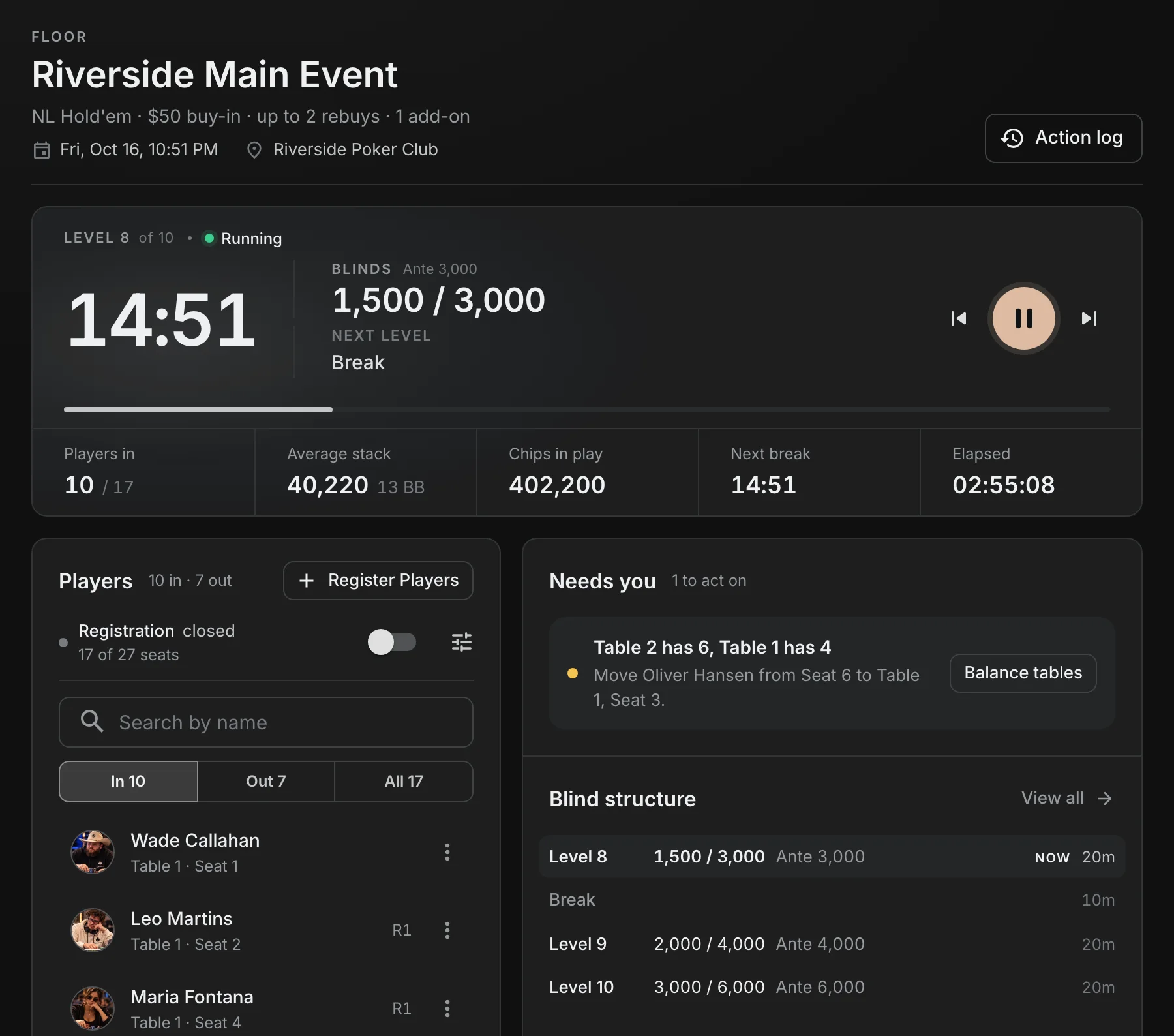
On a wide desktop (about 1400 pixels and up) the players become a rail down the right edge, with the tables under it. On a laptop or iPad they are a card on the left with the board beside it.
The heading
The heading names the game: what is played, the buy-in, rebuys and add-ons, the date and the location. Edit the name and the location right there. Action log opens the log (see below).
The clock
One line holds the time left, the blinds and ante, the next level and the controls: pause or play, a level back, a level forward.
- Drag the progress line under it to set the time left in the level.
- Under the line: players in out of entries, the average stack (with big blinds), chips in play, the time to the next break and the time played.
- A mixed game that changes game on a schedule gets a Next game button beside the level controls.
- Scroll down and a compact clock stays under the heading.
Every press is the same one the clock page makes, so the TV, the clock page and players' phones move together.
Players
The Players card lists the players by table and seat, with their rebuys and add-ons as small tags. Search by name, and filter by In, Out or All.
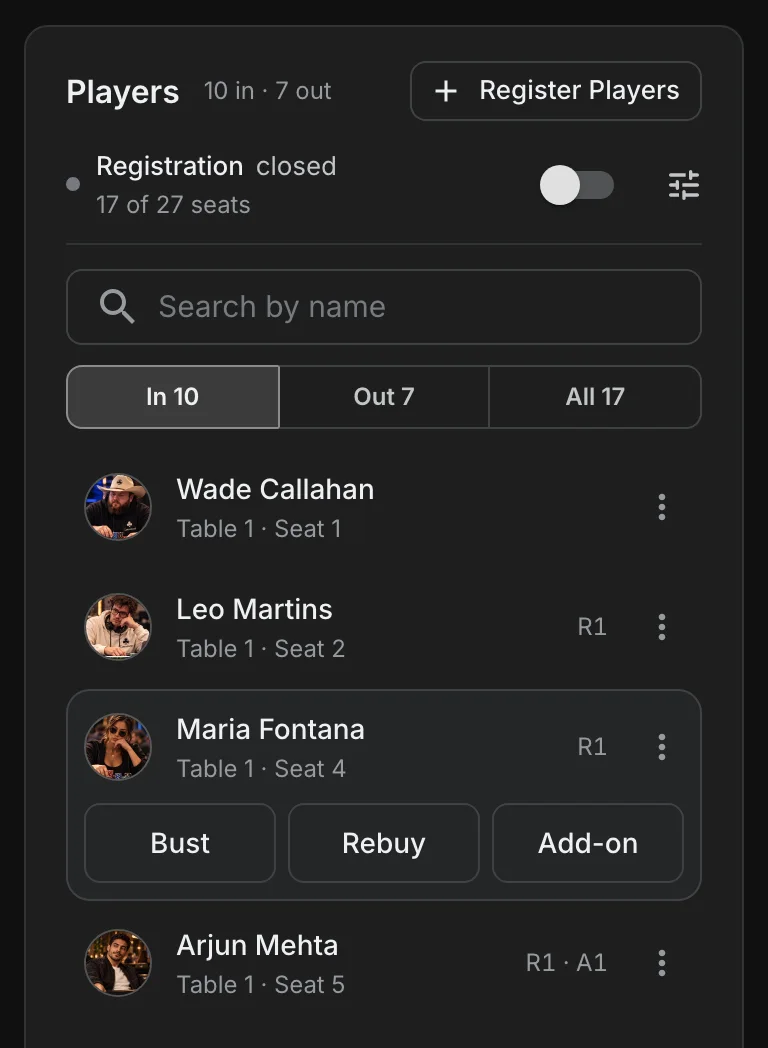
Tap a player for their quick actions:
- Bust opens the elimination dialog, where you can say who knocked them out.
- Rebuy and Add-on show when the tournament allows them, and grey out once the player has used their limit.
- A player who is out gets Undo bust, to take back a bust made by mistake.
- In a re-entry tournament, a player who is out gets Re-enter while registration is open: a new paid entry with a newly drawn seat.
The three dots on a row open the same full menu as the Players page. Register Players adds players while registration is open.
Registration
Above the list, registration says whether it is open or closed, when it closes next (after a level, or at a time) and how many seats are taken. The switch opens or closes it now.
Check-in
In a tournament that requires check-in, the list gets a Waiting filter, and a registered player who has not arrived shows Check in instead of Bust. Only checked-in players get a seat.
Needs you
Needs you works out what the room needs next and puts the button that does it beside each item. It can ask for:
- A table move when tables are out of balance, naming who moves from which seat to which table and seat. Balance tables opens the plan to review before anything moves.
- A seat for players who have none, or a seat draw when there are no tables yet.
- The final table, or a table that can break, once the players left fit at fewer tables.
- Check-ins, with Check in all.
- Registration closing after a level, heads-up, and a clock that has not started.
When there is nothing to do, it says "Nothing needs you right now."
The rest of the board
- Blind structure: the levels around the one in play, breaks included. View all opens the full structure.
- Prize pool: the pool, the entries, rebuys and add-ons behind it, and what each paid place gets. Payouts opens the payouts page. A bounty tournament also shows the bounties paid and still in play.
- Tables: the tables that changed last, seat by seat, and whether the room is balanced.
- Displays: the screens showing the tournament, online or offline, and Connect a screen.
The action log
Action log in the heading opens the game's log beside the board: registrations, busts, rebuys, add-ons, seat moves, payout changes and levels, newest first, each with who did it.
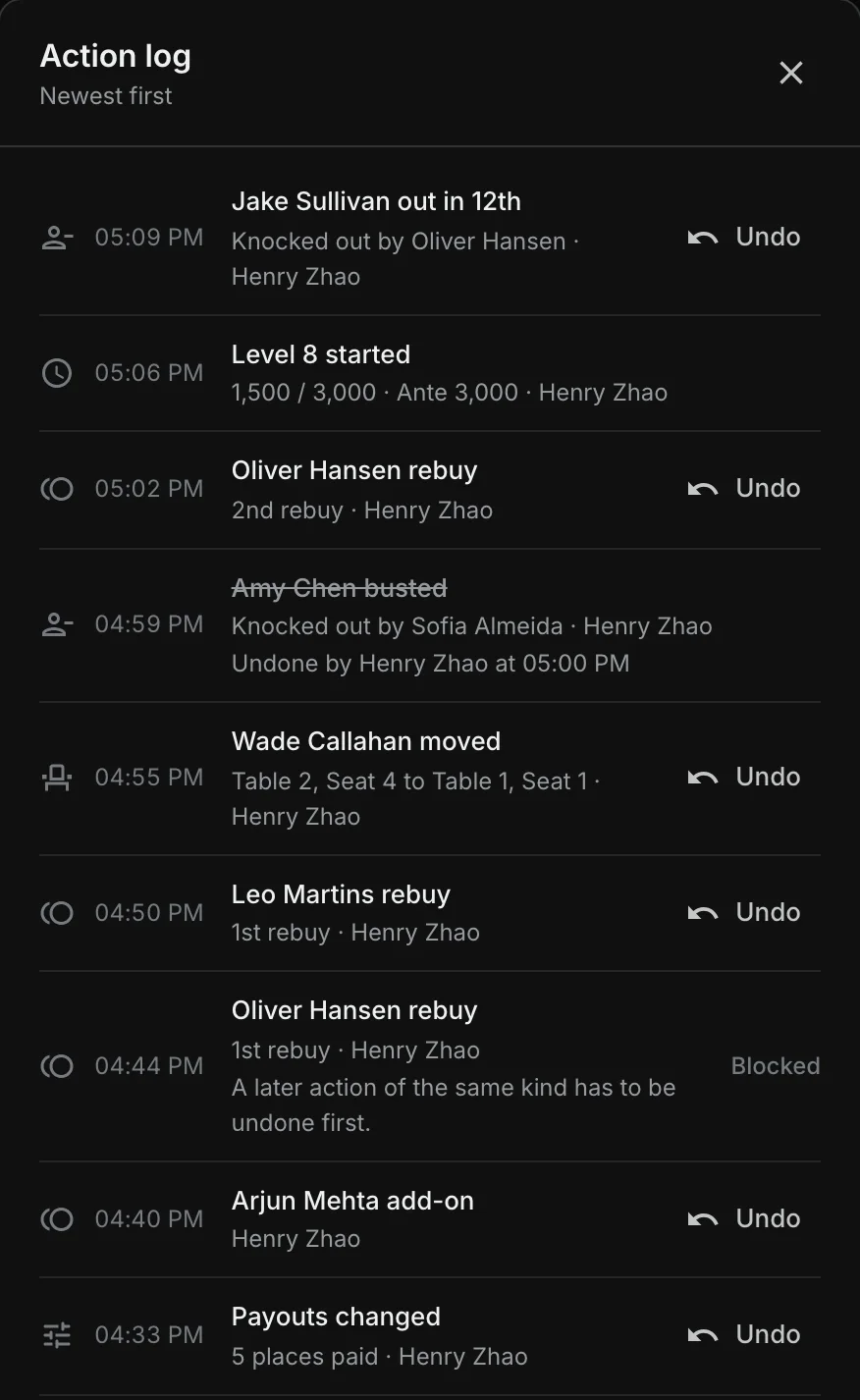
Choose Undo on the row you want to take back:
- A bust: the player goes back to their seat (or the first free one if someone has taken it), and the knockout and any bounty are cleared. Prizes are worked out again.
- A registration: asks first, and is offered only while the player has not played.
- An unregistration: the player comes back, in their old seat if it is still free.
- Rebuys, add-ons, seat moves and payout changes: one step at a time, newest first.
When an entry cannot be undone yet, the row says why instead of offering a button that would fail, for example:
- A later action of the same kind has to be undone first.
- The player was knocked out after this. Undo the elimination first.
- The player has moved since. Undo the later move first.
- Someone is in the old seat now.
An undone entry stays in the log, struck through, with who undid it and when. Levels are in the log but have no Undo: move the clock with the clock. Once the game is over, the log is read-only.
Cash games
A live cash session has its own Floor with the same layout.
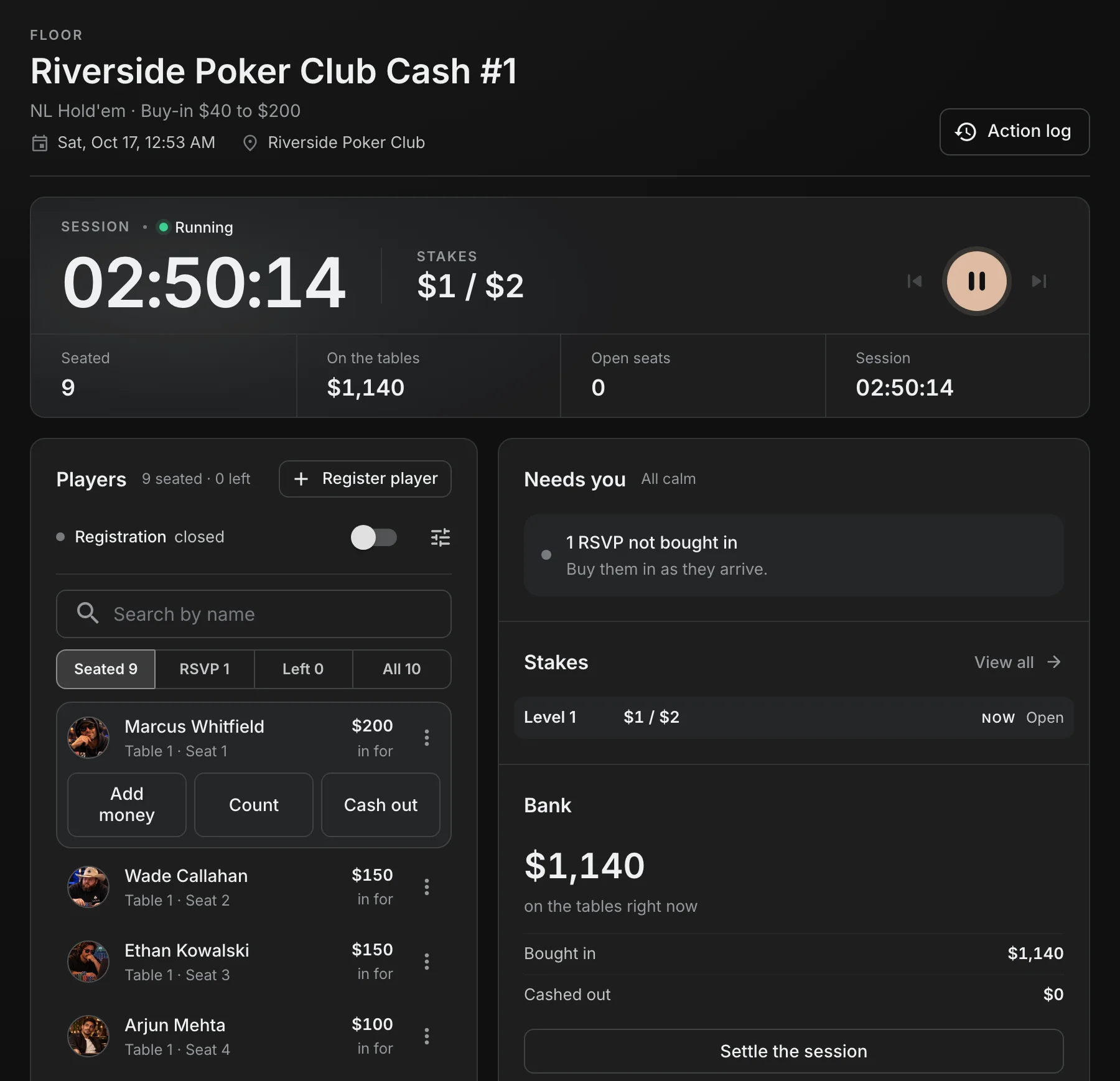
- The clock shows the session time and the stakes, with who is seated, the money on the tables and the open seats.
- Filter players by Seated, RSVP, Left or All. Each row shows what the player is in for.
- Tap a player for Add money, Count or Cash out. A player who left gets Buy back in; an RSVP gets Buy in.
- Needs you counts the RSVPs who have not bought in, warns when the stakes go up soon, and asks you to settle once everyone has cashed out.
- Bank shows the money on the tables, bought in, cashed out and rake, with Settle the session.
The cash action log is the session's ledger and seat moves. A wrong buy-in is voided rather than deleted, so the money record stays whole.
Multi-day events
Each day of a multi-day event has its own Floor, with a banner naming the event and the level the day ends after. When the day is due to end, End of day becomes the Floor's one ask, and Bag stacks opens from the same banner. On the last day the banner offers Stop for the night. See Multi-day events: flights, bags and Day 2.
On a phone
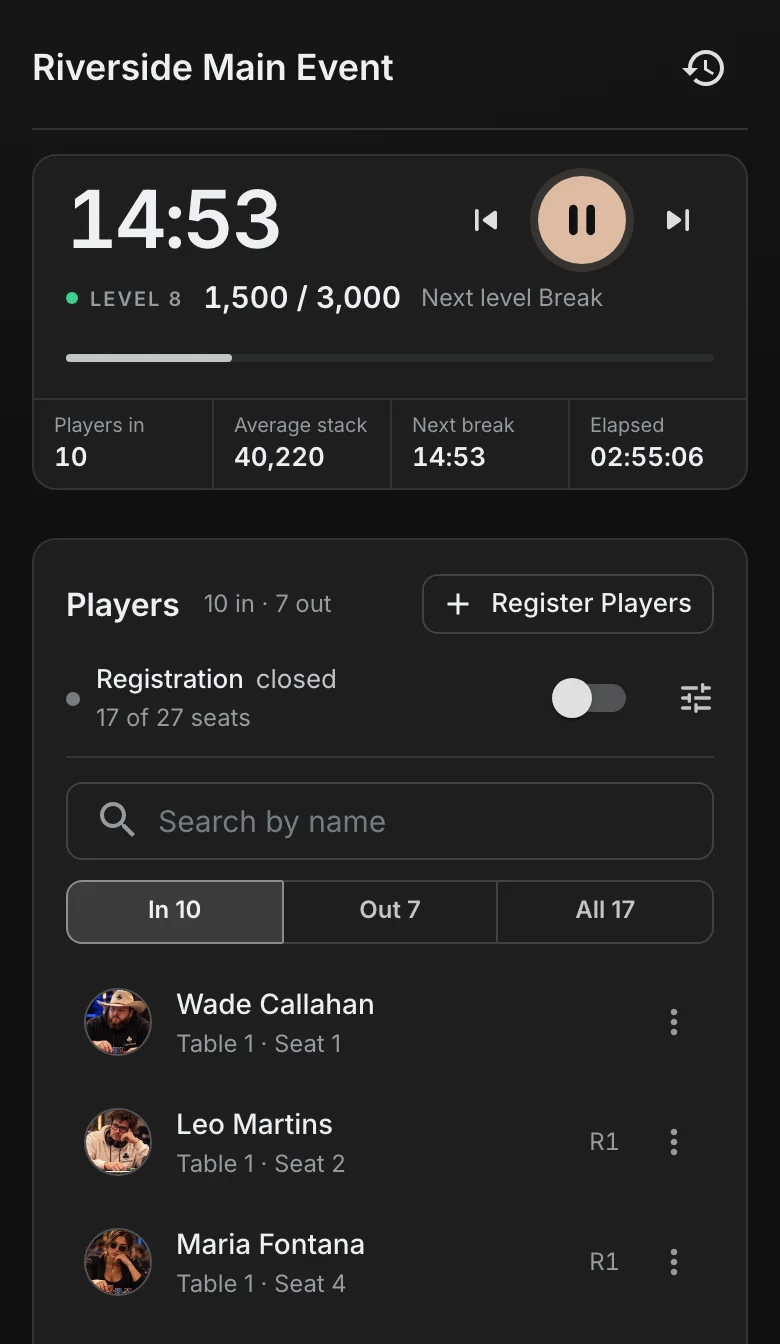
On a phone the heading is one line, the clock is a compact card with its controls, and the players come straight after it.
The clock page keeps its controls
The clock page still works on its own. The clock widget's play, pause and level buttons are on by default; turn them off in the widget's settings for a clean display. The players widget's admin menu starts off, since the Floor is where the room is run from; turn it on in the widget's settings if you want it on the big screen. A plan that cannot save a lobby layout gets both switched on.